
Do you have to authorize Remitian?
Yes. DC uses a Third‑Party Access request and approval.
Part 1: Connecting Your DC Account from Remitian
-
Go to the Remitian Homepage
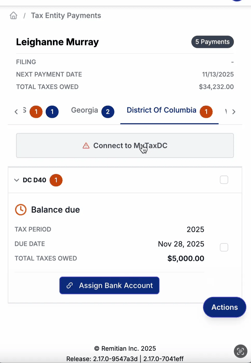
Log in to your Remitian account and click View Tax Payments.
-
Select District of Columbia (DC)
From the list of jurisdictions, choose District of Columbia.
-
Connect to MyTaxDC
- Click Connect to MyTaxDC.
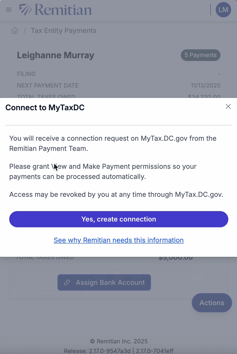
- A message will appear informing you that you are receiving a connection request from the Remitian Payment Team on mytax.dc.gov.
- To allow Remitian to file and make payments on your behalf, you must grant the following permissions:
- View
- Make Payment
-
Authorize the Connection
- Click Yes, Create Connection.
- The connection status will update to Pending Review.
- You will receive an email at the personal email address registered with your MyTaxDC account asking you to approve this connection request.
Part 2: Approving Remitian Access on MyTaxDC
- Log In to MyTaxDC
- Visit mytax.dc.gov.
- Enter your username and password to sign in.
- Access the Action Center
- On your homepage, navigate to Action Center.
- Find the section labeled Third-Party Access Request Pending.
- Click Respond to the Request.
- Approve the Third-Party Access
- You’ll see details for the Remitian Payment Team, including the username, web profile name, and email address.
- Click Yes to approve the request.
- Under Third-Party Access Type, select Remitian from the dropdown menu.
- Check the boxes to grant permission for View and Make Payment.
- Submit the Approval
- Once you have confirmed your selections, click Submit.
- A confirmation screen will appear showing that your request has been approved.
- You will also have the option to print a copy of the confirmation and leave feedback about the process.
Part 3: Creating a MyTaxDC Account (If You Don’t Already Have One)
If you don’t have a MyTaxDC account, you’ll need to create one before you can connect it to Remitian.
-
Visit the MyTaxDC Website
Go to mytax.dc.gov and click Sign Up.
-
Registration Requirements
You’ll need one of the following to register:
- A Notice Number from a letter received from the DC Office of Tax and Revenue, or
- Return or payment information from your most recent tax filing (depending on your account type).
-
Start the Registration Process
- On the instructions page, click Yes under “Do you expect to file and pay DC taxes for yourself or your business?” and then click Next.
- Enter your identification details:
- Federal Employer Identification Number (FEIN),
- Individual Taxpayer Identification Number (ITIN), or
- Social Security Number (SSN).
- Retype your ID to confirm and click Next.
-
Validate Your Identity
- Choose your Validation Method:
- Notice Number: Enter the number from the upper right-hand corner of your correspondence from the DC Office of Tax and Revenue.
- Account Type: Select a registered tax account and enter your last tax due amount (or check the box if it was $0).
- Click Next to continue.
- Choose your Validation Method:
-
Create Your Login Information
- Enter your username, first and last name, and email address.
- Select your phone type and enter your contact phone number.
- Choose a security question and provide your answer for password recovery.
- Click Next.
-
Review and Submit
- On the Registration Summary page, review your information.
- Click Submit to complete your registration.
- A confirmation pop-up will appear. Click OK to finalize.
-
Complete Account Setup
- You’ll receive an email with a temporary password.
- Return to mytax.dc.gov and log in with your username and temporary password.
- Set up your two-factor authentication (app, text message, or email).
- Enter the security code sent to your email and click Confirm.
- Create a new permanent password and click Submit.
- Once complete, your MyTaxDC homepage will display, confirming your account is ready to use.
Next Steps
Once your MyTaxDC account is set up and you’ve approved the Remitian third-party connection:
- You’ll be able to view, schedule, and pay DC tax payments directly from your Remitian dashboard.
- Remitian will automatically sync your payment history and filing details for future use.
Portal: MyTax.DC.gov
Detailed Instructions are listed here on DC website:
How_to_Sign_Up_for_MyTax.DC_.gov_Individual.pdf
How_to_Sign_Up_for_MyTax.DC_.gov_Businesses.pdf
How_to_Request_and_Approve_Third_Party_Access.pdf
POA Notes: DC may require Form D‑2848 for representation; portal access is sufficient for filing/paying.