---
title: How to Request KYC/ Submit KYB Verification for a Client
description: Send KYC verification requests directly from the client profile and track which tax accounts require additional verification or KYB documentation.
---
[Skip to content](https://help.remitian.com/how-to-request-kyc/-submit-kyb-verification-for-a-client#main-content)
English
Show submenu for translations
[More support](https://help.remitian.com/kb-tickets/new?hsLang=en)

Open main navigation
Close main navigation
- English
Show submenu for translations
- [More support](https://help.remitian.com/kb-tickets/new)
- [Contact us](mailto:support@remitian.com)
[Contact us](mailto:support@remitian.com)
How can we help you?
- There are no suggestions because the search field is empty.
1. [Help Center](https://help.remitian.com/?hsLang=en)
2. [Accounting Firms](https://help.remitian.com/accounting-firms?hsLang=en)
3. [Client Management](https://help.remitian.com/accounting-firms?hsLang=en#client-management)
# How to Request KYC/ Submit KYB Verification for a Client
## Send KYC verification requests directly from the client profile and track which tax accounts require additional verification or KYB documentation.
### **How to Request KYC Verification for a Client**
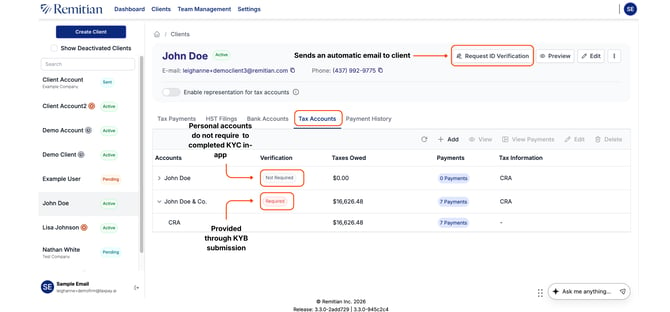
You can request KYC verification directly in Remitian by sending an ID verification email to your client from within the platform.
#### **Steps to Send a KYC Verification Request**
1. Go to Clients in the main navigation menu.
2. Select the client you want to verify.
3. On the client page, click Request ID Verification.
This sends an automatic email to the client with instructions to complete their ID verification.
#### **Understanding Verification Statuses**
Under the Tax Accounts tab, you can view the verification requirements for each account.
### **Personal Accounts**
Personal tax accounts do not require additional verification once the client completes their ID verification request.
The account status will display:
- Not Required
### **Business Accounts (KYB)**
Business accounts require KYB verification and supporting documents.
The account status will display:
- Required
#### **How to Submit KYB Documents**
KYB documents can be submitted directly to Remitian using the secure submission form below:
[Submit KYB Documentation](https://form.jotform.com/260715356145254)
- [Accounting Firms](https://help.remitian.com/accounting-firms?hsLang=en#main-content)
- [Account Management](https://help.remitian.com/accounting-firms?hsLang=en#account-management)
- [Payment Management](https://help.remitian.com/accounting-firms?hsLang=en#payment-management)
- [Client Management](https://help.remitian.com/accounting-firms?hsLang=en#client-management)
- [APIs](https://help.remitian.com/accounting-firms?hsLang=en#apis)
- [Tax Payer](https://help.remitian.com/tax-payer?hsLang=en#main-content)
- [Payment Management](https://help.remitian.com/tax-payer?hsLang=en#payment-management)
- [Account Management](https://help.remitian.com/tax-payer?hsLang=en#account-management)
- [Frequently Asked Questions (FAQ)](https://help.remitian.com/frequently-asked-questions-faq?hsLang=en#main-content)
- [Account Management](https://help.remitian.com/frequently-asked-questions-faq?hsLang=en#account-management)
- [Payment Management](https://help.remitian.com/frequently-asked-questions-faq?hsLang=en#payment-management)
- [KYC & KYB Frequently Asked Questions](https://help.remitian.com/frequently-asked-questions-faq?hsLang=en#kyc-kyb-frequently-asked-questions)
- [Changelog](https://help.remitian.com/changelog?hsLang=en#main-content)
- [Remitian](https://help.remitian.com/changelog?hsLang=en#remitian)
- [TaxPay](https://help.remitian.com/changelog?hsLang=en#taxpay)
- [Video Library](https://help.remitian.com/video-library?hsLang=en)
[](https://www.remitian.com)
© Remitian. The Standard for Tax Payments.
[mailto:email@email.com](mailto:email@email.com)
Copyright © 2025, Remitian Inc..